Nobody plans to spend a week resizing photographs. It happens because the images arrived in eleven different sizes, half of them on a beige background, three of them rotated, and the store needs one consistent grid by Thursday.
Image work at catalogue scale is not a design problem. It is a pipeline problem, and the difference between an afternoon and a fortnight is entirely in how much of it was decided before the first file was opened.
Decide the specification once, in writing
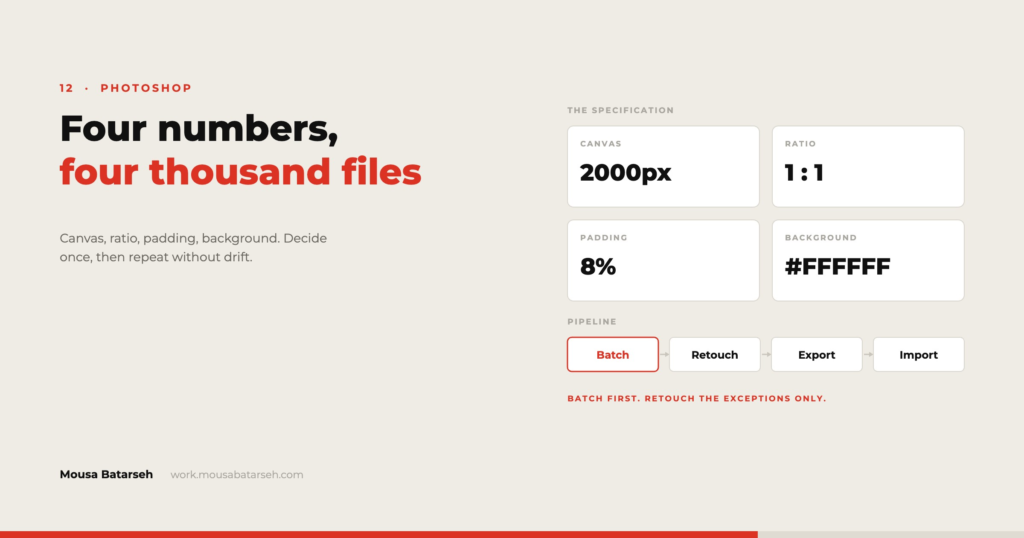
Before anything is processed, four numbers get fixed and written down: the canvas dimensions, the aspect ratio, the padding around the product, and the background colour.
Those four decisions determine whether a category grid looks deliberate or accidental. A row of products shot at different distances reads as a jumble even when every individual photo is good, because the eye compares sizes across the row and concludes the store is disorganised.
Square is the safest ratio for mixed catalogues because it survives every layout — grids, carousels, thumbnails, and the odd places a platform will put an image without asking. Anything taller works beautifully for apparel and badly for everything else.
Naming is part of the image
A file called IMG_4471.jpg costs money every time somebody touches it. The name should be derived from the SKU, with a suffix for the shot: UTW-CRWN-NVY-1.jpg, -2, -alt, -detail.
The payoff arrives at import. If filenames follow the SKU scheme, images attach to products automatically and nobody matches anything by hand. If they do not, someone opens a folder of four thousand files and matches them by eye, which is a task that has no natural end and no way to verify.
This is the same argument as the one for a disciplined SKU scheme — the identifier is doing work in three systems at once, and consistency is what makes the work automatic.
Batch first, retouch second
The pipeline has two stages and they are not interchangeable.
The batch stage is mechanical and applies to everything: strip the background where it is required, place the product on the fixed canvas with the fixed padding, normalise the white point, sharpen for screen, export at the target sizes. In Photoshop this is an action driven by a droplet or the Image Processor; the point is that the same operations happen to every file in the same order, so results are reproducible.
The retouch stage is human and applies to the exceptions — reflective surfaces, awkward shapes, products where automatic selection cuts off a strap. On a catalogue of a few thousand, that is usually well under a tenth of the files.
The failure is starting with retouching. It feels productive and it means the specification is being invented one file at a time, which guarantees inconsistency.
The checks that catch problems before the store does
- Contact sheet the output. Twenty images per page, viewed at grid size. Sizing and background inconsistencies are invisible at full size and obvious in a grid.
- Sort the folder by file size. The largest and smallest files are almost always the mistakes — something uncompressed, something upscaled from a thumbnail.
- Count. Files in should equal files out. A silent action failure loses a handful of images and nobody notices until a customer does.
- Check one on a phone. Detail that reads on a monitor disappears at thumbnail size, which is where most of the catalogue is actually seen.
What the store does after you hand it over
The pipeline is only half the job. The site then generates its own sizes, and if the source is too small it upscales and everything looks soft; too large and pages get heavy for no visual gain.
I export a master at roughly double the largest display size and let the platform derive the rest, then check the generated sizes against the theme rather than assuming. It is also worth deleting the sizes the theme never uses — a default WordPress install can create six variants of every image, and on a large catalogue that is a lot of storage and backup time spent on files no page requests.
What this is really about
Product photography at scale is an operations discipline wearing a creative job title. The creative decisions are real but they are made once, at the start, for the whole catalogue — and then the work is about doing the same thing four thousand times without drift.
The stores that look expensive are rarely the ones with the best individual photographs. They are the ones where every photograph obeys the same four numbers.