The import button is the least interesting part of a catalog migration. By the time you press it, every meaningful decision has already been made — usually in a spreadsheet, usually days earlier, and usually without anyone calling it a decision.
I moved a 14,000-SKU catalog into WooCommerce for Universal Wholesale. The technical import was a handful of runs. The work was everything in front of it: deciding what each source field meant, what it should become, and what to do about the rows where the answer was neither obvious nor consistent.
That work has a name — field mapping — and it is treated as clerical far more often than it deserves. Done properly, it is where you make the catalog better than it was. Done casually, it is where you carry a decade of someone else’s data debt into a new system and make it permanent.
What a mapping document actually has to answer
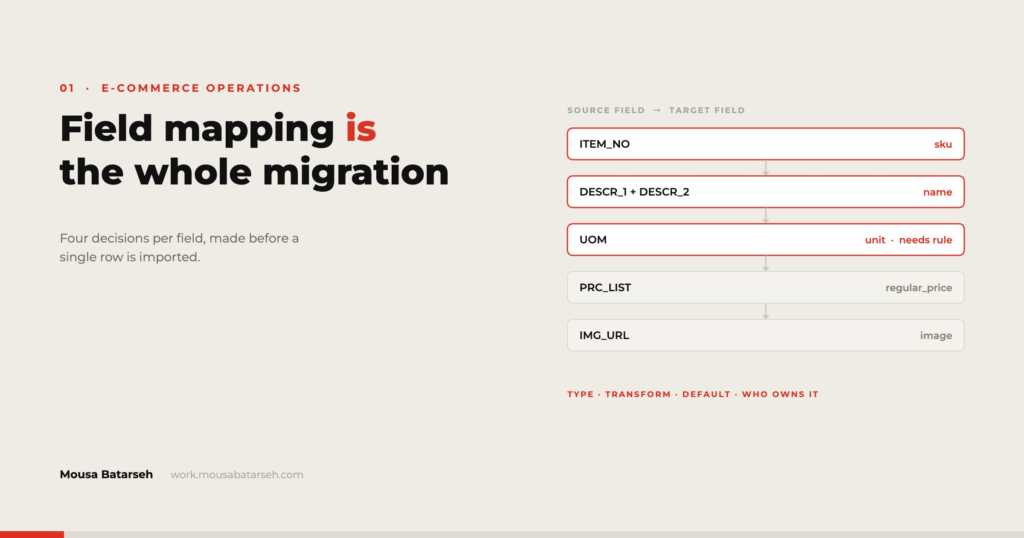
A mapping document is usually drawn as two columns: source field on the left, destination field on the right. Two columns is not enough. For every field, four questions need an answer written down:
1. Where does it come from? Not just the column name — the actual source. Some fields come from the old platform’s export. Some come from a supplier sheet. Some come from a spreadsheet the owner keeps separately and forgot to mention. Some do not exist yet and have to be generated.
2. What does it become? The destination field, including its type and any constraints. WooCommerce will accept almost anything into a text field, which is exactly why you have to decide the constraint yourself.
3. What transformation applies? Trim, case-normalise, split, concatenate, look up, round, pad. Write the rule, not the intention. “Clean up the weights” is not a rule. “Strip units, convert to pounds, round to two decimals, blank if non-numeric” is.
4. What happens when it is empty or invalid? This is the question people skip, and it is the one that determines how much cleanup happens after launch. Leave blank? Use a default? Hold the row back? Flag for review? Every field needs an answer, and “we’ll see” is how 400 products end up published with a price of 0.
Four answers per field, on a catalog with forty fields, is 160 decisions. Making them in a document takes a day. Making them ad hoc during import takes a month and produces a catalog nobody trusts.
The fields that cause the most trouble
Some fields are boring and behave. Others reliably eat time, and it is worth knowing which before you quote a timeline.
SKU. The one field that must be unique, stable, and never regenerated. Source data frequently violates all three — duplicate SKUs across suppliers, SKUs with trailing spaces that make two identical values not match, SKUs that Excel has helpfully reformatted. Check uniqueness on the raw export before anything else, because every later step assumes it.
Variants. The largest structural difference between platforms and the biggest single source of migration pain. WooCommerce models a variable product as a parent row plus a row per variation; Shopify groups variants under a shared handle with option columns. Translating between these is not a find-and-replace — it is a restructuring, and any product whose options are inconsistent across variants has to be resolved by a human before it can be represented at all.
Categories and taxonomy. Source categories are almost never a clean tree. They are a flat list, or a tree with items in two places, or a tree that encodes brand and type and use case on the same level. The migration is the only realistic chance to fix this, because reorganising 14,000 products after launch means reorganising live URLs.
Price fields. Regular price, sale price, cost, MSRP, case price, tier price. The number of price columns in a wholesale catalog is genuinely surprising, and mapping the wrong one to the storefront price is the fastest way to lose money on a launch day.
Identifiers. UPC, GTIN, MPN. These are the fields most likely to have been silently destroyed by a spreadsheet — leading zeros stripped, long numbers converted to scientific notation. Treat every identifier column as text from the moment it leaves the source system, and verify digit length rather than assuming.
Images. Usually referenced by filename or URL, usually inconsistent, frequently missing for a subset. Decide up front what a product with no image does: publish anyway with a placeholder, or hold back. Both are defensible. Not choosing means the answer gets made by whoever notices first.
Validate in passes, not at the end
The instinct is to clean everything, import, then check. A better sequence is to validate in narrowing passes, because each pass makes the next one cheaper.
Pass one — structural. Does every row have a SKU? Are SKUs unique after trimming whitespace? Does every variation have a parent that exists? Are the column counts consistent across the whole file? This pass catches problems that would corrupt an entire import, and it runs in minutes.
Pass two — type and range. Are prices numeric and non-negative? Are weights within a plausible range? Are identifier fields the right length? Do dates parse? This is where a formula-based check sheet earns its keep — a column of validation flags beside the data, so a row either passes or names its own problem.
Pass three — referential. Does every category referenced exist in the category list? Does every image filename correspond to a file that was actually delivered? Does every supplier code map to a supplier?
Pass four — business logic. This is the one that cannot be automated and cannot be skipped. Does the price make sense for the product? Is the case quantity plausible? Would anyone reading this product title know what they were buying? A sample of a few hundred rows, reviewed by someone who knows the business, catches things no validation rule will.
Then import into a staging environment, not production. Run the same four passes against what actually landed. Platforms transform data on the way in — truncating fields, coercing types, reassigning categories — and the only way to know what yours did is to look.
The decision nobody documents: what not to migrate
Every large catalog contains products that should not survive the move. Discontinued items nobody removed. Duplicates created by a supplier changing their format. Test products from 2019. Items with no image, no description, and no sales history.
Migrating them is easy. Deciding not to is work, because someone has to own the call.
The useful move is to make it a filter rather than a debate: agree a rule with the client before you start — no sales in 24 months and no stock on hand, for example — apply it, and produce a list of what the rule excluded. The client reviews the list, not the whole catalog. That turns “should we keep this?” from 14,000 questions into one policy decision plus a short review.
Where this approach is more than the job needs
Not every migration deserves a four-question mapping document and four validation passes.
Under a few hundred SKUs with clean source data, the overhead exceeds the benefit — map it directly, import, and review the whole catalog by eye, because reviewing 200 products is genuinely feasible.
If the source and destination are the same platform, most transformation questions disappear and the work collapses to a structural check and a category review.
And if the catalog is being replaced rather than moved — new photography, rewritten descriptions, new taxonomy — then the old data is a reference, not a source, and mapping it in detail is effort spent on something that will be overwritten.
The method earns its cost when the catalog is large enough that you cannot review it by hand, when data comes from more than one source, or when the destination models products differently from the origin. That covers most wholesale and multi-supplier catalogs, which is why it is the default I start from.
A short pre-migration checklist
Before quoting a timeline on a catalog migration, I want to know:
- How many products, and how many of those are variable?
- How many source files, and do they agree with each other?
- Are SKUs unique and stable in the source?
- How many price fields exist, and which one is the storefront price?
- Does the category structure need to change, and who decides?
- Are images available, and for what percentage of products?
- What is the rule for excluding products, and who signs it off?
- Is there a staging environment?
Eight questions. If more than two do not have clear answers, the migration is not ready to be scheduled — and saying so early is far cheaper than discovering it mid-import.
If you are planning a move like this and want a second set of eyes on the mapping before anything is imported, that is exactly the stage where an outside review pays for itself. My project work has more detail on catalogs I have handled, and I am reachable through the contact section.