Open a supplier’s product file, glance at it, and it looks fine. Columns line up. Prices look like prices. Nothing is obviously wrong.
Then you import it and a third of the UPCs are eight digits instead of twelve, four products have a price of 1.5E+11, and a size column has quietly become a list of dates in March.
None of that came from the supplier. It came from the spreadsheet, which made a series of confident assumptions the moment the file was opened — and it made them silently, which is what makes this category of problem expensive. There is no error message. The data simply becomes wrong and stays that way until something downstream notices.
Product data prep is mostly a defensive discipline. You are protecting a file from the tools you are using to edit it, and then proving that what you produced is what you intended.
The damage spreadsheets do on open
These are the failures I check for first, because they happen before you have made a single edit:
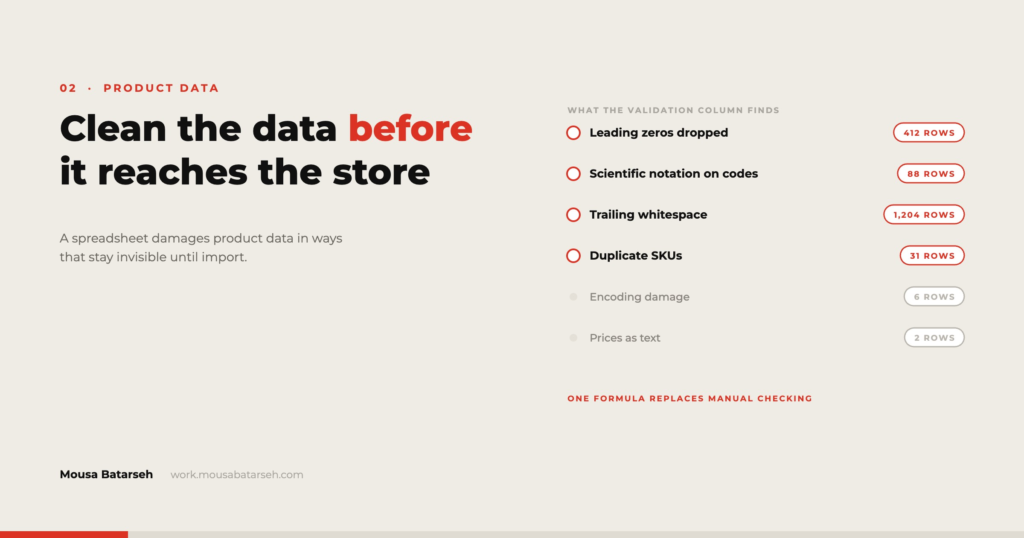
Leading zeros disappear. A UPC of 012345678905 becomes 12345678905. The value is now wrong and there is no way to recover the original from the file alone — you have to go back to the source. This affects UPCs, GTINs, some MPNs, postal codes, and any SKU scheme with zero padding.
Long numbers become scientific notation. A 13-digit EAN displays as 9.78031E+12, and if the file is saved in that state, that string is what lands in the CSV.
Text becomes dates. Sizes like 3-5 and 1/2 are read as dates. Chemical names, model numbers, and ratio-formatted specs all get caught by this. It is the most destructive of the three because the result looks plausible.
Encoding breaks on save. Accented characters and typographic quotes arrive intact and leave as ’ or é. This shows up in brand names and descriptions and tends to be noticed by the client, on the live site, after launch.
Trailing whitespace survives everything. ABC-100 and ABC-100 are two different SKUs to every import routine ever written, and identical to every human who looks at them.
The fix for the first three is the same and it is boring: never open a raw data file by double-clicking it. Import it, specifying every column that must stay text as text. In Excel that is Data → From Text/CSV with column types set explicitly; in Google Sheets it is turning off automatic conversion on import. It takes thirty seconds and removes an entire class of problem.
For encoding, save as CSV UTF-8 and then verify by reopening in a plain text editor rather than trusting the spreadsheet’s preview.
For whitespace, trim on the way in and again on the way out.
Build a validation column, not a cleaning pass
The common approach is to clean a file section by section and then eyeball it. On a few hundred rows that works. On several thousand it does not, because you cannot hold the rules in your head consistently across a long session.
The alternative is to make the file check itself. Add one column at the far right that returns either an empty string or a description of what is wrong with that row. Something along these lines:
=TEXTJOIN("; ", TRUE,
  IF(A2="", "missing SKU", ""),
  IF(COUNTIF(A:A, A2)>1, "duplicate SKU", ""),
  IF(NOT(ISNUMBER(D2)), "price not numeric", ""),
  IF(AND(ISNUMBER(D2), D2<=0), "price zero or negative", ""),
  IF(LEN(F2)<>12, "UPC not 12 digits", ""),
  IF(E2="", "missing category", ""),
  IF(A2<>TRIM(A2), "SKU has whitespace", "")
)
Now filtering that column to non-empty gives you the complete work queue, and it updates as you fix things. When the column is empty for every row, the file is structurally ready — not correct, but ready.
Two things make this more useful than it first looks. It is reusable: the same column, adjusted for column letters, works on the next supplier file. And it is a communication tool — sending a client a filtered list of 43 rows that name their own problems gets a far better response than asking them to “check the catalog.”
The transformations that cover most of the work
Across most supplier files, the same handful of operations do the majority of the cleaning:
Normalise case in titles. Supplier data arrives in ALL CAPS more often than not. Proper case is not a straight function call, because it will capitalise Ml, Usb, and Pvc. The practical approach is proper case followed by a lookup table of terms that must stay uppercase.
Split combined fields. A single Product column containing brand, name, and size has to become three columns before it can be mapped. Splitting on a delimiter works when the format is consistent; when it is not, split what you can, flag the rest, and handle them by hand.
Standardise units. 12 oz, 12oz, 12 OZ, and 0.75 lb should all resolve to one numeric column and one unit column. Do this before anyone builds a filter on the storefront, because inconsistent units produce filters with four entries for the same size.
Deduplicate deliberately. Duplicates are rarely identical rows. They are the same product from two suppliers with different SKUs, or the same SKU with two different prices. Deduplication needs a rule about which record wins — most recent, lowest cost, preferred supplier — and the rule should be written down, because it will be questioned later.
Generate what is missing. Slugs, meta titles, and short descriptions can often be constructed from fields you already have. A generated value with a consistent pattern is better than an empty field and better than 3,000 individually written ones. It is not better than good copy on your top sellers, which is where hand-written descriptions should go.
Variants are not a formula problem
Everything above is mechanical. Variants are not.
A variable product needs the same option names, in the same order, across every one of its variations. Supplier data routinely violates this — one variation has Color and Size, another has Colour and Size, a third has only Size because the colour is baked into its title. No formula resolves that, because the underlying information is genuinely missing or inconsistent.
The workable process is to isolate them: group rows by parent, count distinct option sets per group, and pull out every group where the count is greater than one. That list is your manual queue. It is usually a small fraction of the catalog and it consumes a disproportionate share of the time, which is worth knowing before you commit to a schedule.
When a spreadsheet is the wrong tool
I use spreadsheets for most of this because they are transparent, the client can open them, and the work is auditable. But there is a threshold.
If the file is large enough that recalculation takes seconds per edit, the feedback loop is too slow to work in. If the same transformation has to be applied to a supplier feed every week, it should be a script, not a repeated manual sequence. If the cleaning requires joining three or more files on different keys, a database or a proper data tool will be faster and less error-prone than nested lookups.
The signal I use: if I am about to do the same clean-up for the third time, I stop and automate it. Twice is a task. Three times is a process.
The prep sequence, in order
- Import the raw file with explicit column types — identifiers as text.
- Keep an untouched copy of the raw file. Every subsequent step is destructive.
- Trim whitespace across all text columns.
- Add the validation column and read what it says before changing anything.
- Fix structural problems first — missing and duplicate SKUs, orphaned variations.
- Apply transformations in a fixed order, one at a time, checking the validation column after each.
- Isolate the variant exceptions and work them manually.
- Export as CSV UTF-8 and reopen in a text editor to confirm encoding and delimiters.
- Import to staging, then run the validation logic against what actually landed.
Step nine is the one most often skipped and the one that catches the most. The file you produced and the data the platform stored are not the same thing until you have checked.
Clean product data is unglamorous work that determines whether everything downstream — search, filters, feeds, ads, reporting — functions or quietly misleads. It is a large part of what I do, and there are more examples in my project work.