Most on-page SEO advice assumes a page count you can hold in your head. Write a unique title. Write a compelling meta description. Make sure the H1 matches search intent. All correct, and all completely impractical at 14,000 products.
The instinct is to compromise on quality — write shorter, faster, worse versions of the same thing across the whole catalog. That produces fourteen thousand mediocre pages and a lot of hours spent.
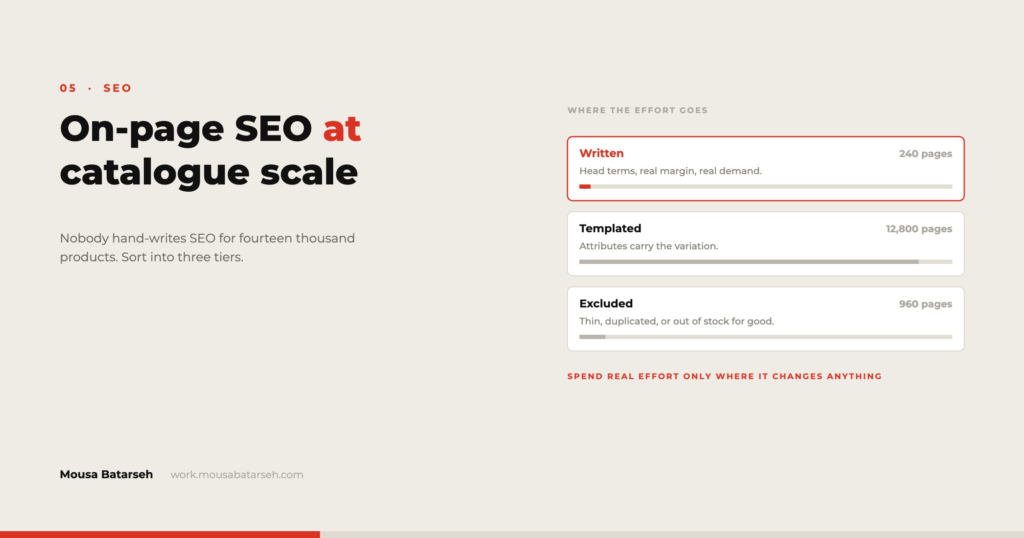
The better move is to stop treating the catalog as one thing. A large catalog contains maybe forty pages that genuinely compete for search traffic, a few hundred that support them, and thousands that exist to be found by someone who already knows what they want. Those three groups deserve completely different treatment, and sorting them is the actual work.
Tier one: pages worth writing by hand
These are category and collection pages, plus your genuine best-sellers. Usually somewhere between twenty and a hundred URLs on a catalog of any size.
They earn hand-written treatment because they target queries people actually search — wholesale cotton fabric by the case rather than a specific SKU — and because they are where category-level authority accumulates.
What goes into them:
- A title written for the query, not assembled from fields.
- Genuine introductory copy that says what the category contains, who buys from it, and how it is organised. Two or three paragraphs, placed where it does not push the products below the fold on mobile.
- Internal links out to the sub-categories and to the two or three products that best represent the range.
- Answers to the questions the sales team actually gets about that category. This is the highest-value and most-skipped element, because it requires talking to someone.
Tier one is small enough to maintain properly. Treat it as a content project with a schedule, not as a task inside a migration.
Tier two: pages worth templating well
The bulk of product pages. These are found by people searching a model number, a brand plus product name, or arriving from a feed or an ad. They do not need persuasive copy; they need to be complete, distinct, and correctly marked up.
Templating gets a bad reputation because it is usually done badly — a pattern like {Product Name} | Buy Online | {Store Name} applied to everything, producing thousands of near-identical titles.
A template works when it draws on fields that genuinely differ:
Title:  {Brand} {Product Name} — {Key Spec} | {Category}
Meta:   {Product Name} from {Brand}. {Key Spec}, {Pack Size}.
        In stock and ready to ship. Case pricing available.
The difference between a good and a bad template is entirely in field selection. Pick fields that vary across the catalog, and the output varies. Pick fields that do not, and you have written one title fourteen thousand times.
This is where clean product data stops being a data project and becomes an SEO project. A template can only be as specific as the fields behind it — which is why category, brand, and spec fields being populated and consistent matters more for search than any amount of copywriting.
Also on tier two:
Descriptions that are not the supplier’s. Identical manufacturer copy across every retailer who sells that product is the most common thin-content problem in wholesale. You will not rewrite all of them. Rewrite the top sellers, and for the rest, add a short store-specific block — pack sizes, lead time, who typically buys it — that makes the page not identical to a hundred others.
Product structured data. Name, image, brand, SKU, offer, price, availability. This should be generated from the same fields as everything else. Verify the output against Google’s Rich Results Test rather than assuming the plugin got it right.
Images with real filenames and alt text derived from product fields. cotton-poplin-white-60in.jpg beats IMG_4471.jpg, and the alt text can be templated from brand plus name plus key spec.
Tier three: pages that should not be in the index
This is the tier people forget, and it is often the one with the biggest effect.
A large catalog generates enormous numbers of URLs that have no business appearing in search results: filter combinations, sort orders, pagination beyond the first few pages, internal search results, and near-duplicate variant URLs. Left alone, they consume crawl attention and dilute the signals for the pages you care about.
The decisions to make explicitly:
Faceted navigation. Decide which filter combinations are valuable landing pages — usually a small set, like brand within category — and let those be indexable with proper canonical handling. Everything else should not be crawlable. Google publishes guidance on this and it is worth reading directly rather than following summaries.
Variant URLs. If each colour of a product has its own URL, decide whether they are separate products or one product with options, and canonicalise accordingly. Being undecided is the expensive state.
Out-of-stock and discontinued products. A permanent decision, made once: keep the page and mark availability, redirect to the category, or remove it. All three are defensible. Making the choice product by product is not.
Internal search results pages. These should not be indexable, and they frequently are by default.
Internal linking is the lever nobody pulls
On a large catalog, internal linking does more for discoverability than any amount of on-page copy, and it is almost entirely mechanical.
Three patterns that are worth building:
Category-to-product links from tier-one pages. Every category page should link deliberately to its best products, not just render a grid.
Related products driven by data, not by a plugin’s default. Same brand, same category, complementary use. This is a field-driven decision and it is far more useful than “customers also viewed” on a catalog with little traffic history.
Breadcrumbs that reflect the real taxonomy. These do double duty — navigation for users and structure for crawlers — and they only work if the category tree is coherent, which loops back to getting the taxonomy right during migration.
Measuring without fooling yourself
Two habits keep catalog SEO honest.
First, segment. Sitewide organic traffic tells you almost nothing on a catalog this size, because tier-three noise swamps tier-one movement. Report on category pages and top products separately from the long tail.
Second, watch coverage and indexation, not just rankings. On a large catalog, the most common problem is not that pages rank poorly — it is that they were never indexed, or that thousands of pages you did not want were. Search Console’s index coverage report answers that directly and is more actionable than a rank tracker for the first few months.
Where this does not apply
A catalog under a few hundred products does not need tiers. Write them all properly; it is achievable and it will beat any templated approach.
A store whose traffic comes almost entirely from paid channels or from an existing wholesale relationship may reasonably deprioritise catalog SEO altogether and put the effort into feed quality and site speed instead. Not every store should be trying to rank.
And a catalog that is about to be restructured should not be optimised first. Do the taxonomy work, then the SEO, or you will do it twice.
The through-line is that catalog SEO is mostly a data problem wearing a marketing hat. The pages get better because the fields behind them get better — which is why I treat product data quality and search performance as the same piece of work. There are examples in my project work.