There is a version of a website that is finished and a version that is merely done. The difference shows up about four months later, when someone needs to add a page.
If the site was built well, they duplicate an existing page, change the content, and publish. If it was not, they duplicate an existing page, change the content, and end up with a page whose heading is a different size than every other page on the site — because the original heading was styled locally, and now there are two conventions where there was one.
That gap is not a design problem or a talent problem. It is a structural one, and almost all of it is decided before the first page is built.
Settle the system before you build anything
The most common failure in an Elementor build is that global settings get configured after the pages, as a tidying step. By then the pages have already accumulated local overrides, and the global settings only apply where nothing overrode them — which is a smaller set than anyone expects.
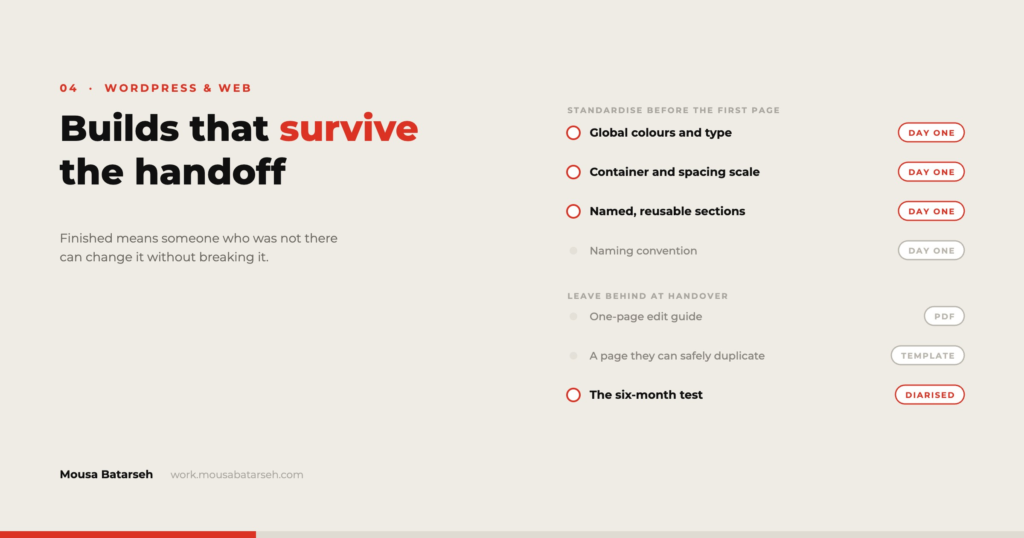
Before the first page:
Define Global Colors with meaningful names. Not Color 1 through Color 6. Primary, secondary, text, muted text, surface, border. Names describe roles, and roles survive a rebrand — when the accent colour changes, you edit one value rather than hunting hex codes.
Define Global Fonts as a scale, not a set of samples. Decide the sizes for each heading level and body text, including their responsive values, and use them. If a page needs a size that does not exist, that is a decision about the scale, not a one-off.
Set the Theme Style defaults. Buttons, form fields, links, and default typography site-wide. A site where these are empty and everything is styled locally is a site where a global change is a manual sweep.
Decide the container conventions. Maximum content width, standard section padding, and a spacing scale for gaps. Write these three numbers somewhere before you build; they are the difference between a site with rhythm and a site with twelve slightly different section heights.
None of this is glamorous and all of it is faster than the alternative, which is doing it later across forty pages.
Standardise the parts that repeat
Once the system is set, the next question is what gets built once and reused.
Header and footer as templates, not as content on each page. Obvious, and still occasionally skipped.
Section templates for anything appearing more than twice — the call-to-action band, the testimonial block, the contact strip. The test is not whether it appears twice today; it is whether a new page would want it.
A page template per page type, not per page. A service page template, a project page template, a general content template. The client’s new page starts from a type, which is what keeps new pages consistent with old ones.
Naming that reads like a filing system. Section — CTA — dark, Template — Service page, Header — main. When a library has thirty saved items with names like Untitled Section 4, the library stops being used and everything gets rebuilt by hand.
A useful discipline: give every saved template a one-line note in its title or description stating where it is used. Six months on, nobody can remember whether deleting something will break a page.
Build pages so the content is separable from the layout
This is the part that determines whether a client can edit safely.
Keep nesting shallow. Every unnecessary wrapper container is a place for a stray value to hide and a level a non-technical editor has to navigate past to reach the text they want.
Keep spacing on containers, not on individual widgets. If a gap comes from a container’s gap setting, there is one place to change it. If it comes from a margin on the widget above plus padding on the container, a client who deletes that widget also deletes the spacing, and the page collapses in a way they cannot diagnose.
Avoid styling text inside content widgets. A heading that gets its size from the global scale will follow a future change to that scale. A heading with a size typed into it will not, and will be silently wrong forever.
And leave the pages editable in the obvious place. If the client’s most common edit is changing a paragraph, that paragraph should be findable in about three seconds by someone who does not know what a container is.
What actually gets handed over
A handover is a set of artefacts, not a phone call. The ones that matter:
A short site guide, specific to their site. Two to four pages. How to edit the pages they will actually edit, how to add a new page from a template, how to update the header menu, and how to add an image properly. Screenshots of their site, not generic ones.
A named list of what not to change. Theme settings, global colours and fonts, templates, and any plugin configuration. Named explicitly. People respect a boundary they have been shown; they walk straight through one that was only implied.
Credentials and access, documented. Hosting, domain registrar, WordPress admin, any third-party services, and the licence keys for any premium plugins — including when those licences renew, and whose card is on file. This is the single most common gap I see when taking over someone else’s site.
A plugin inventory with reasons. What each plugin does and why it is there. A future maintainer deactivating “that caching plugin nobody uses” is a real event with real consequences.
A backup and update policy in writing. Who runs updates, how often, and what the rollback is. If the answer is “nobody,” say that plainly so the client can decide whether they are comfortable with it.
The six-month test
There is a simple way to know whether a build held up, and it does not require the client to tell you.
Six months after launch, look at the site and ask three questions:
Are there heading sizes that do not exist in the global scale? If yes, someone needed something the system did not provide, and worked around it.
Are there pages that do not match any template? If yes, either a page type was missed or the templates were too rigid to be usable.
Has anyone added a plugin? If yes, find out what problem it solved. Usually it is a problem the build should have handled, and the client reached for the only tool they had.
None of these are failures exactly. They are feedback about the gap between the system you designed and the work the client actually needed to do — which is information you can only get after handover, and which makes the next build better.
Where this level of structure is not warranted
A landing page with a three-month life does not need a template library.
A site the client will never edit — because they have said so, and there is a maintenance arrangement in place — does not need an editing-first structure. It needs good documentation for whoever maintains it, which is a different deliverable.
And a small site built for someone with no technical confidence at all is sometimes better served by fewer options rather than more. Handing over a flexible template system to someone who is afraid of breaking it produces the same outcome as handing over nothing: they call you. In that case, build it simply, be honest that they will need help, and price the relationship accordingly.
The general principle holds regardless of size: decide who maintains this before deciding how to build it. Everything else follows from that answer.
If you are inheriting a site that was not handed over well, an audit of the structure before you start making changes usually saves more time than it costs. There is more about how I approach builds in my project work, and my contact details are on the site.