A restaurant menu is one of the few pages on a website with a guaranteed change schedule. Prices move. Items get dropped. A seasonal special appears for six weeks and leaves. Whatever you build will be edited, repeatedly, by someone who did not build it and does not want to learn how.
That single fact should determine the structure, and it usually does not. Menu pages tend to get designed as a layout — a nice grid, good typography, a photo band — and the editing experience is whatever falls out of the layout afterwards. Which is how a restaurant ends up emailing their web person to change a price from 12 to 13.
I have built menu-driven pages for Firefly Burgers and a drive-thru flavour menu for a retail client. The design work in both was straightforward. The structural decision — how the content is stored and who can touch it — was the part that mattered.
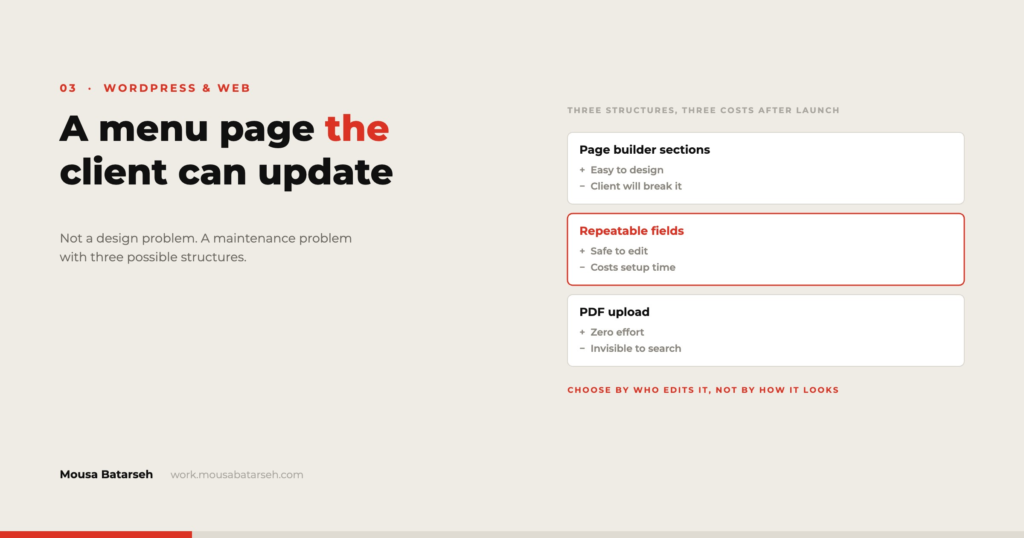
Three structures, and what each one costs later
There are really only three ways to do this, and they trade the same two currencies: build time and edit friction.
One: laid out directly on the page
Every item is a text widget or a heading inside the page layout. Fastest to build, and it looks exactly right because you are placing everything by hand.
The cost arrives on the first edit. The client opens the editor, sees a nested structure of containers, and either cannot find the price they want to change or changes it and breaks the alignment. The page has no separation between what the content is and how it looks, so every content edit is also a layout edit.
This is the correct choice more often than purists admit — for a menu that genuinely does not change, or a single-page site where the owner will always call you anyway. It is the wrong choice the moment “we’ll update it ourselves” is said out loud.
Two: a repeatable content field
The menu lives in structured fields — a custom post type for menu items, or a repeater field on the page — and the layout pulls from it. The client edits a list of items with a name, description, price, and category. They cannot break the design because they never touch it.
This is the right default for most restaurants. It costs more to build, needs a plugin such as Advanced Custom Fields or an equivalent, and requires you to decide the fields carefully up front, because adding a field later means revisiting every item.
The design constraint is real and worth stating: a structured menu looks consistent because it is consistent. If the client wants one item styled differently because it is the house special, that has to be a field — a checkbox for “featured” — not an ad hoc override. Anticipating those exceptions is most of the skill in this approach.
Three: an external source
The menu is maintained in a spreadsheet or a POS system and the site reads from it. Powerful when the menu already exists somewhere authoritative, and it removes double entry entirely.
It is also the most fragile. The site now depends on a system you do not control, and a formatting change at the source can break the page. I would only choose this when the external source is genuinely the system of record and someone is already maintaining it carefully — which, in practice, means larger operations rather than single locations.
Choosing between them
The decision comes down to four questions, and I ask them before quoting:
How often does the menu change, honestly? Not “occasionally.” Ask for the last four changes and their dates. The remembered answer and the written record are rarely the same, and the record is what you should build for.
Who will make the change? A specific person. If the answer is a name, structure two is worth building. If the answer is “we’ll let you know,” structure one is fine and cheaper.
Does the menu have exceptions? Items with two sizes and two prices. Items with an add-on list. A section that is only shown at lunch. Every exception is a field or a condition, and enough of them push you toward structure two even for a menu that rarely changes.
Does the menu exist anywhere else? If it is already maintained in a POS or a printed-menu file, ask whether the website should follow it or replace it. Two sources of truth for a menu is a guarantee that they will disagree within a month.
Building the editable version well
If you take structure two, a few decisions determine whether it stays pleasant to use:
Keep the field set small and obvious. Name, description, price, category, availability flag, featured flag. Every additional field is something the client has to understand. Fields they do not understand get left blank, and blank fields become layout holes.
Handle the empty and long cases in the template, not the content. A description that is blank should collapse cleanly. A name that runs to eight words should wrap without breaking the price alignment. These are template decisions, made once, and they are what stops the page degrading as the client adds real items.
Give categories an explicit order field. Alphabetical is never the order a menu wants. Leaving it to post date means the order changes as items are added.
Make price a text field, not a number. This is counterintuitive and I hold it firmly: menus contain Market Price, 12 / 18, and +2. A numeric field forces the client to fight the form. If you need numeric prices for structured data, store both.
Build the mobile version first. For a menu, mobile is not a breakpoint, it is the primary use case — someone standing outside deciding whether to come in. Design the phone layout, then let the desktop version be the adaptation.
What to hand over
The build is not finished when the page looks right. For a menu specifically, the client needs three things:
A one-page guide with screenshots showing exactly where to change a price and how to add an item. Not a general WordPress manual. The specific clicks, for their site.
A defined place for seasonal items, so a special does not get added by duplicating an existing item and editing it, which is how orphaned drafts accumulate.
An explicit statement of what they should not touch — usually the template, the categories structure, and anything in the theme settings. People respect a boundary far better when it is named than when it is merely implied.
Where this is more structure than the job needs
A pop-up or a one-off event menu that will exist for three weeks does not need a content architecture. Build it as a layout and move on.
A menu that is fundamentally a PDF the client already produces professionally is often best served by displaying that PDF well, with an accessible text fallback, rather than rebuilding it in HTML. The rebuild is only worth it if the site gains something — search, filtering, per-item structured data, or genuinely better mobile reading.
And if the restaurant has no one who will maintain it, the honest answer is to say so and set up a retainer instead of building an editing interface that never gets used. An elegant editing experience nobody opens is wasted budget.
The structural question — who edits this, how often, and with what skill — applies well beyond menus. It is the first question I ask on any content-heavy build, and it is usually more consequential than anything about the layout. More of that work is in my projects.